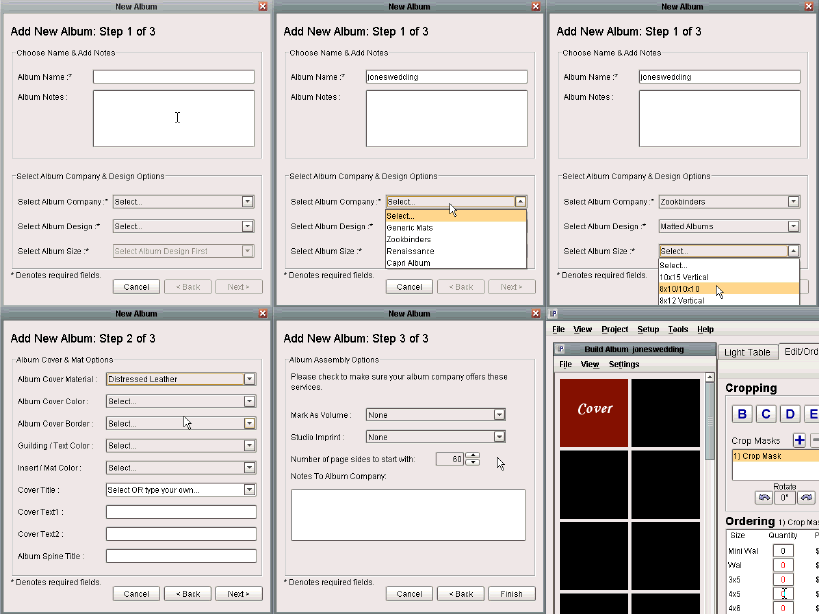
Add New Album: Step 1 of 3
The first step of the process requires you to designate a name for the album and select the album company and album type. Once you have selected the album company that the album will be fulfilled through, you must choose an album design that the company offers, as well as a size for the selected design. In this case, we have chosen to create the album with Zookbinders, selected our album type to be one of their Matted Albums, and finally chose the size of the matted album to be 8x10/10x10. Once you have made your selections, press the 'Next' button to continue.
Add New Album: Step 2 of 3
The second step of the process contains optional settings for your album including cover material, cover color, cover border, mat color, and cover title. These settings are not mandatory, so you may choose what you like, and then proceed by clicking the 'Next' button.
Add New Album: Step 3 of 3
The final step for creating a new album doesn't have any required fields either, but does have a few more optional settings. You may mark the album as a volume number, add your studio imprint, and select the number of mat pages for the album. Once you have made your choices, click the 'Finish' button, and your blank album will appear. Please see the following tutorials for more information on working with albums.